

Cookie consent isn’t exactly the fun part of running a website. It can feel technical, jargon-heavy, and easy to get wrong.
The good news? In 2026, you don’t need to be a developer to handle cookie consent properly — and you don’t have to sacrifice useful analytics to do it.
Here’s a summary of what you’ll find in this guide:
- Cookies are small text files that help connect user sessions and events. Consent is a user’s explicit permission to store non-essential cookies. Both are now table stakes for any website.
- US vs. EU privacy laws: GDPR requires opt-in consent before any tracking fires, while most US states require opt-out controls. Either way, the trend is the same: more transparency, more user control, and an opt-in approach is the safest bet for both.
- Cookie consent doesn’t have to mean killing analytics—especially with Google’s enhanced conversion modeling, which helps estimate conversions from anonymized, consent-denied traffic.
- Google Consent Mode v2 is non-negotiable in 2026: Without it, adding a cookie banner can actually break your Google Ads conversions, enhanced conversions, and reporting accuracy. With it, your tags adjust dynamically based on consent status, so you stay compliant and keep your data intact.
- You can set this up without writing code (mostly): Using Google Tag Manager and a cookie consent platform like CookieYes or Cookiebot, you install two scripts once, then manage everything — consent defaults, tag firing rules, and testing — inside those platforms.
The state of cookies in 2026
Privacy regulations increasingly favor the user’s right not to be tracked. Since going into effect in 2018, the European Union’s General Data Protection Regulation (GDPR) has inspired other jurisdictions—including some U.S. states—to adopt stricter consent laws. This has created a patchwork of privacy laws and sparked middle-of-the-night panic from marketers worried about losing visibility of their customers. But brands and audiences can both rest easier thanks to Google Consent Mode v2. Before we get into that, some level-setting.
What exactly is a cookie?
When someone interacts with your website, they create a series of “events” (loading pages, clicking buttons, submitting forms, etc.). To make sense of those events across multiple pages or visits, websites and analytics tools use cookies. A cookie is a small text file stored in a user’s browser that helps identify a session or returning visitor.
A cookie may store limited information such as:
- A session or user identifier
- Traffic source details (UTMs)
- Device or browser information
- Conversion indicators
Tracking is when a website sends structured data about events to platforms like Google Analytics or Google Ads. Cookies provide context for that data by helping to connect events to a session or user. This distinction is why privacy laws focus not just on cookies, but on how user data is collected, shared, and used.
Managing Consent
Consent is a user’s permission for your site to store non-essential cookies on their device or share data with third-party platforms (like Google or Meta).
Users generally have the right to:
- Say “no” to tracking
- Change their preferences later
- Keep their session anonymous to analytics and advertising tools
Depending on where you do business, you may be required to display a cookie consent banner that allows users to confirm their tracking preferences. In 2026, the best practice and the simplest option is to use cookie banners regardless of location.
Whether you need specifically “opt-in” consent or simply an option to “opt-out” depends on where your users are and which laws apply — but expectations are trending in the same direction everywhere: more transparency, more control for users.
US cookie laws vs. GDPR (the practical difference)
| GDPR (European Union) | United States (Most States) |
Consent is “opt-in” | Consent is generally “opt-out” |
Non-essential cookies must be blocked by default | You must inform users and give them control |
Users must say “yes” before tracking starts | Sensitive data may require explicit opt-in |
Even if you only operate in the U.S., using an opt-in-style cookie banner is the cleanest and safest approach. It simplifies compliance across states, works with Google’s requirements, and avoids future rework.
Why tracking matters (even with privacy laws)
If you’re not tracking user behavior at all, you’re assuming how visitors are using your site. Tracking helps you:
- See where users drop off from your website
- Improve overall user experience
- Increase conversions (sales, email list signups, etc.)
- Understand which content performs best
- Make smarter business decisions
The easiest way to manage tracking today without constantly touching your website code is Google Tag Manager (GTM).
With GTM, you can install a piece of code once on your site, then manage everything else in the platform with tags (code that sends data to platforms), triggers (when a tag should run), and variables (what information tags collect).
With a cookie consent platform (CMP) plus GTM using Google Consent Mode v2, you have everything you need to stay consent-compliant and still collect valuable tracking data.
What is Google Consent Mode v2 (and why should you care)?
Google Consent Mode v2 lets Google tags adjust how they behave based on user consent, instead of simply turning on or off. It manages signals like:
- analytics_storage
- ad_storage
- ad_user_data
- ad_personalization
If a user declines consent, analytics and advertising cookies aren’t stored. Instead, Google receives limited, anonymized signals that allow the platform to model conversions responsibly.
Why Google Consent Mode v2 is essential in 2026
It will likely break your analytics if you add a consent banner without GTM and without a properly configured Consent Mode v2. Here’s why:
- Google Ads conversions may stop tracking correctly
- Enhanced conversions won’t work
- Reporting accuracy may drop
- You risk policy violations
However, with fully functional Consent Mode v2, your site will stay compliant, preserve attribution data, unlock advanced measurement features for future compliance, and, of course, respect user privacy.
But enabling Consent Mode v2 isn’t enough; it has to be carefully configured, or you risk introducing numerous points of failure. Below, we walk you through how to set up Consent Mode v2 correctly to integrate a CMP with Google Tag Manager.
This setup is a good fit if you:
- Want U.S.-focused compliance in 2026
- Aren’t intentionally targeting users outside the U.S.
- Want to be ready for GDPR-style rules if needed
- Don’t want to hard-code tracking logic
- Plan to use:
- A cookie consent platform (CMP)
- Google Tag Manager
- Want to enable Google Consent Mode v2, including enhanced conversions
Practical steps for US cookie compliance
1. Understand Your Cookies
Instead of asking users to approve every individual cookie one by one, websites group cookies into types (like analytics or advertising), and users give consent to an entire group at once. Only essential cookies will run automatically and don’t require consent, as they help with site functionality and security. The other categories are typically:
- Analytics – performance and usage tracking
- Advertising – ads and remarketing
- Embedded / Functional – video players, chat tools
You’ll be able to analyze and group all cookies currently being stored and sent from your website in your cookie banner CMP.
2. Update Your Privacy Policy
Your privacy policy should clearly explain what data you collect, why you collect it, who it’s shared with, and how users can opt out or request deletion.
3. Implement a Cookie Consent Platform (CMP)
This is where tools like CookieYes or Cookiebot come in. A CMP displays your cookie banner, stores user consent choices, lets users update preferences later, and communicates consent status to Google Tag Manager. Most modern CMPs support Google Consent Mode v2, which is exactly what Google expects in 2026.
4. Give Users Real Control
Set up your CMP to earn users’ trust. Best practices include:
- Clear “accept” and “reject” options
- A preference center
- A visible “Do Not Sell or Share My Personal Information” link when applicable
These configurations are often defaulted, but can usually be customized inside the CMP.
You have a GTM container and a CMP—now what?
1. Install the 2 platform scripts on your website
I promise, this is the only coding you’ll have to do! Both GTM and your CMP will provide a script that needs to be added to your website code. Once this is done, you can manage everything inside those platforms.
2. Configure the cookie categories inside the CMP
Inside the CMP, you’ll be able to scan your site for what cookies are being collected. You can then drag them into their appropriate categories, deciding which require consent. Tools like Google Analytics or Google Ads must also be mapped to categories.
3. Connect the CMP to Google Tag Manager
Your CMP needs to pass consent choices into GTM so that it knows whether analytics or ads are allowed—and can update dynamically if preferences change.
Most CMPs provide simple setup steps or GTM templates for this. For CookieYes and CookieBot implementations, we at Intrepid have used these templates inside GTM to create the CMP tag. With the “Consent Initialization” trigger, this tag fires first and is the main connection between your website, CMP, and GTM.
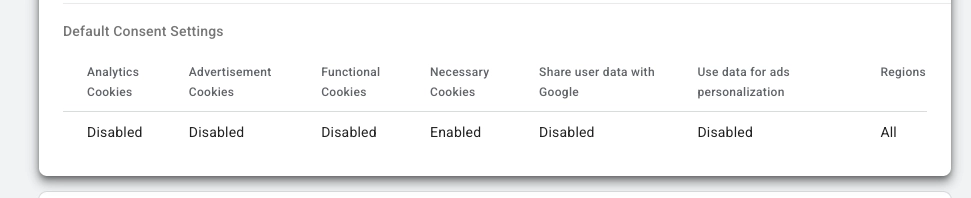
This tag is also where you will set the Default Consent State of your website cookies by category—usually in a table like this:
4. Update tags in GTM to respect consent
Now review any existing tags. Each can be categorized the same way cookies were in the CMP.
What you’re doing:
- Telling GTM which consent type each tag requires
- Making sure analytics and ad tags only fire when allowed
5. Test. Every. Scenario.
Finally, inside GTM preview mode, test interactions with the consent banner and your site to see which events fire and in what order. Be sure to test every consent scenario — accepted, denied, partial consent, etc.
If everything works as expected, you’re good to publish that GTM container version. Congrats! You can now track website data responsibly.
Common Mistakes to Avoid
Your tests may surface issues during setup. Common snags include:
Firing Tags Before Consent
If a tag fires before consent is established, check its trigger and firing priority. Some tags (or templates) may bypass consent if they aren’t explicitly configured to wait for it.
Overlapping Scripts
Conflicting scripts embedded directly in your site’s code can cause duplicate tracking, ignored consent signals, or unexpected behavior.
Consent signals not being passed correctly
If your cookie banner appears to work but tracking still behaves inconsistently, the CMP may not be properly communicating consent choices to Google Tag Manager. This often happens when:
- Consent Mode v2 is enabled in name only
- Default consent states are misconfigured
- The CMP tag does not fire early enough using a Consent Initialization trigger
Final thoughts: privacy-first doesn’t mean data-blind
Cookie consent doesn’t have to mean killing analytics—especially with Google’s enhanced conversion modeling, which helps estimate conversions from anonymized, consent-denied traffic.
So, while there’s a lot to consider, have no fear—in fact, be intrepid this year when it comes to data law compliance.
If you’d like a consultation on what steps you should consider for your site, get in touch with us.